Protocols/Create: Difference between revisions
From OpenWetWare
Jump to navigationJump to search
made explanation more detailed |
Barry Canton (talk | contribs) No edit summary |
||
| Line 4: | Line 4: | ||
#Click on the create this page link. | #Click on the create this page link. | ||
#View and copy the source from the [[Protocols/Template|'''protocols template''']] into your new page and begin editing. '''Make sure you are not editing this page.''' | #View and copy the source from the [[Protocols/Template|'''protocols template''']] into your new page and begin editing. '''Make sure you are not editing this page.''' | ||
#Check your work by clicking the | #Check your work by clicking the http://openwetware.org/images/2/28/ShowPreviewButton.jpg button. | ||
#Save the changes by clicking [[Image:SavePageButton.jpg]] ... and you're off. | #Save the changes by clicking [[Image:SavePageButton.jpg]] ... and you're off. | ||
Revision as of 22:22, 18 May 2007
Creating a New Protocol
- In the search box on the lefthand side navigation bar, type
Protocol name. If it is a protocol specific to your lab, typeLabName:Protocol name(be sure and replaceLabNamewith your PI's last name likeKnightorSmolke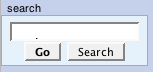
- You should see a page come up with a message saying "There is no page titled "Protocol name". You can create this page." If you don't see this message then that means a page with that name already exists. You'll need to choose a different protocol name.
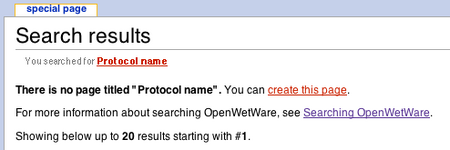
- Click on the create this page link.
- View and copy the source from the protocols template into your new page and begin editing. Make sure you are not editing this page.
- Check your work by clicking the http://openwetware.org/images/2/28/ShowPreviewButton.jpg button.
- Save the changes by clicking
 ... and you're off.


